# Import the library to read robots.txt files
import urllib.robotparser as urlroboparserResponsible Web Scraping Practices for Beginners
(A) Data Collection
Font Awesome
infographics
library - requests
library - urllib
library - time
library - pandas
library - bs4
The beginner’s guide to responsible and robust web scraping practices, such as pausing between requests, reading the robots.txt file, and exception handling.

time.sleep() when web scraping.Introduction
Data scraping from public webpages is a hands-free and efficient method of collecting data. Once set up, the code can run day and night, collecting data on your behalf. Depending on the complexity of the code, it may be able to extract information in under a second… perhaps too quickly.
Websites are hosted on servers with finite capacity. When your code sends repeated requests over a short period of time to a website, it can hit the server far more quickly than a human ever would. Too many requests in a short interval can slow down the site, overload the server, or trigger automated defenses. Some websites will temporarily block your IP address if they detect what looks like abusive or bot-like behavior.
Good web scraping practices keep you from inadvertently leading a cyberattack on a website, and prevents your IP address from being banned of access. This tutorial will demonstrate how beginners can carry out data scraping in a responsible and robust manner.
What You’ll Learn in this Tutorial
By the end of this short tutorial, you’ll learn how to:
- Follow
robots.txtcrawling guidelines set by a website - Pause between HTTP requests with the
time.sleep() - Handle exceptions, including setting a
timeoutparameter to avoid hanging requests
If you prefer to skip the explanations and jump straight to the implementation, you can download the code from my GitHub repository.
Here is the list of things you’ll need to run the code.
Prerequisites
- A copy of either the
responsible-web-scraping.ipynbJupyter notebook or theresponsible-web-scraping.pyPython script from my GitHub repository - Python libraries
urllibrequeststimepandasbs4
Jargon
Web scraping: Using code to extract information from a web page or a source that’s primarily designed for human viewing.
Web crawling: The automated process of bots or software programs systematically browsing and indexing web pages.
Exception handling: A special procedure for a program to follow when it deviates from the normal or intended operation.
Reading the robots.txt File
The first thing to access when intending to scrape data from a website is the robots.txt file. The robots.txt file is essentially a guideline of each website, instructing what automated web crawlers are allowed to do, what they are not allowed to do. It tells how quickly web crawlers are allowed to hop from page to page, and which pages are off-limits. It is advised that a human making a web scraping program also follow these guidelines.
So where is the robots.txt file?
Generally, the file can be found by manually typing the website URL, followed by /robots.txt. For example, the robots.txt file for the Google website can be found at https://www.google.com/robots.txt. Similarly, the file for GitHub can be found at https://github.com/robots.txt.
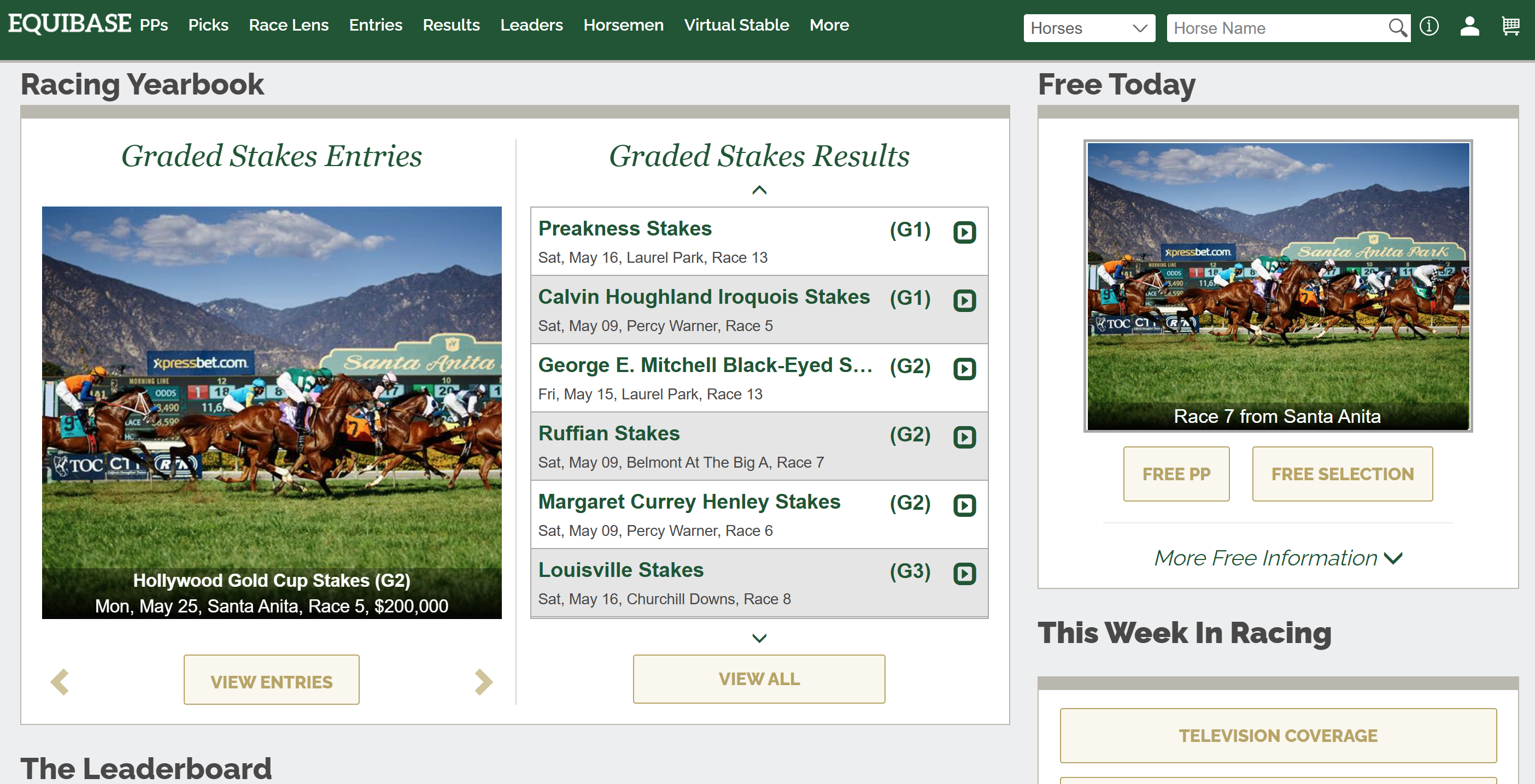
Let’s see what the contents of a typical robots.txt file looks like with the Equibase website. This website contains horse racing statistics and results from various races happening in North America.
First, let’s import a library suited for reading robots.txt files.
Next, access Equibase website’s robots.txt file.
# URL with the robots.txt file
robots_url = 'https://www.equibase.com/robots.txt'

# Create a parser for the robots.txt file and set the URL
robots_txt = urlroboparser.RobotFileParser()
robots_txt.set_url(robots_url)

# Read the contents of the robots.txt file
robots_txt.read()
Now we can print out the contents of the robots.txt file:
# Print out the contents of robots.txt
print(robots_txt)
User-agent: Mediapartners-Google*
Allow:
User-agent: 008
Disallow: /
User-agent: *
Crawl-delay: 5
Disallow: /absolutebm/
Disallow: /banmanpro/
Disallow: /bcup2001/
Disallow: /bcup2002/
Disallow: /bcup2003/
Disallow: /bcup2004/
Disallow: /bcup2005/
Disallow: /premium/eqbRaceChartCalendar.cfmIn the first few lines, we have:
User-agent: Mediapartners-Google*
Allow:
This is allowing the Google’s Adsense web crawler, Mediapartners-Google, to have complete access to all of Equibase’s webpages.
On the other hand, Equibase is prohibiting the web crawler called 008 from accessing any of its web contents:
User-agent: 008
Disallow: /
I’m not an expert on web crawlers, but it seems like this user agent is an uninvited guest.
Then we have all other web crawlers as designated by User-agent: *:
User-agent: *
Crawl-delay: 5
Disallow: /absolutebm/
Disallow: /banmanpro/
Disallow: /bcup2001/
Disallow: /bcup2002/
Disallow: /bcup2003/
Disallow: /bcup2004/
Disallow: /bcup2005/
Disallow: /premium/eqbRaceChartCalendar.cfm
If we were to scrape data from the Equibase website, we’d want to keep out of the above directories, specified with Disallow:. Additionally, Crawl-delay: 5 tips us to wait at least 5 seconds between HTTP requests.
A Tip for When the robots.txt File is Not Available
You may notice that some websites do not have a robots.txt file. Others may have a file, but may not designate a Crawl-delay, making you unsure whether your web scraping code is waiting long enough between HTTP requests.
For me, given that I am not in a hurry to collect my data, I like to time myself. I use the time it takes for me to start from one webpage where I’d like to collect the data, and navigate to the next webpage containing data. I use this value as the delay between my HTTP requests. If my web scraping code is about the same speed as a human clicking through the website, it will most likely not be flagged as a cyberattack.
Pause Between Requests with time.sleep()
Now that we know how long to wait between HTTP requests, let’s try including this in our code. Pausing between requests can be implemented with the time.sleep() function. Here are the general steps involved:
- Set up a basic
forloop that sends a series of requests - Incorporate a delay between requests with
time.sleep()
As such, we’ll need the requests library and the time library.
# Library required for data scraping
import requests
import time
We’ll demonstrate a series of time delayed HTTP GET requests by accessing 10-minute interval weather data of different days from the Japan Meteorological Agency’s website.
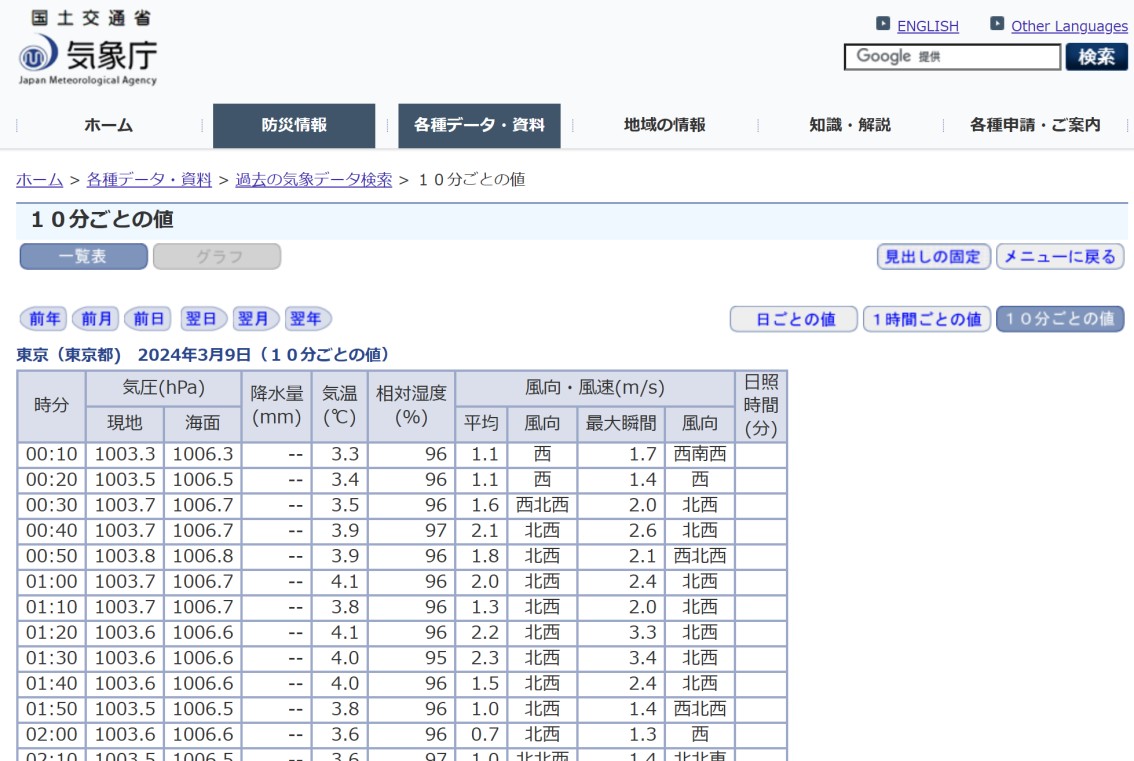
To show that we are successfully accessing different HTMLs with each HTTP request, we will modify the code from a previous blog post on how to scrape weather data from the Japan Meteorological Agency’s website, to take a peek at the scraped data.
Note that we’ll need the pandas library to store the data in a tabular format, and the BeautifulSoup function from the bs4 library to parse the HTML.
# pandas needed to show data in tabule
import pandas as pd
from bs4 import BeautifulSoup
Parts of the code from the previous blog post to read the tabular data and organize it into a pandas DataFrame are simplified and condensed into the PeekAtWeatherData() function below:
def PeekAtWeatherData(http_resp):
    """Function to return the 10 min JMA weather data, given the HTTP requests
    AUTHOR:     Mai Tanaka (www.DataDrivenMai.com)
    DATE:       2026-05-25
    REQUIRES:   http_resp = HTTP response object returned from requests.get() function
    RETURNS:    JMA_df = dataframe containing weather data
    """
    # pandas dataframe to store the weather data
    headers_s1 = (['time',
            'local atmospheric pressure (hPa)',
            'sea level pressure (hPa)',
            'precipitation (mm)',
            'temperature (℃)',
            'relative humidity',
            'average wind speed (m/s)',
            'average wind direction',
            'max wind speed (m/s)',
            'max wind direction',
            'sunshine (minutes)'])
    JMA_df = pd.DataFrame(columns=headers_s1)

    # HTML parser to make sense of the Response object
    beaut_soup = BeautifulSoup(http_resp.content, "html.parser")

    # Find all the <table> tags
    html_tables = beaut_soup.body.find_all('table')

    # Search for the table ID
    # Search for '00:10' string in the table
    for table in html_tables:

        # If the '00:10' string is inside this table
        if table.find_all(string='00:10') != []:
            table_id = table.attrs['id']
            table_class = table.attrs['class'][0]

    # Select all rows within the target table
    table_rows = beaut_soup.select('table#' + table_id + ' tr')

    # Iterate through each row in the table
    rowCount = 0
    for rowNow in table_rows:

        # Search for the data_0_0 class that contains the weather data
        list_data = rowNow.select('.data_0_0')

        if len(list_data) == 0:
            # There is no data in this row (ie. it is a column headers), so skip
            continue

        else:
            # Timestamp is the first td element in the row
            temptime = rowNow.select_one('td')
            time_now = temptime.text.strip() # Strip away the tags and excess spaces
            JMA_df.loc[rowCount, 'time'] = time_now

            # Work through each data element to extract meteorological data
            columnCount = 1
            for dataNow in list_data:
                # Extract just the data (remove tags and spaces)
                justData = dataNow.text.strip()

                # Save the data into the appropriate location and increment columnCount
                JMA_df.loc[rowCount, headers_s1[columnCount]] = justData
                columnCount = columnCount + 1

            # Increment rowCount
            rowCount = rowCount + 1

    # Return the dataframe containing the weather data
    return JMA_df
We’ll access the Japan Meteorological Agency (JMA) Tokyo weather station for the dates of March 1, 2024 to March 5, 2024. This only requires a minor change in the URL after &day= and before &view=. We’ll use this to our advantage to generate the appropriate URL within the for loop.
# URL containing 10-minute interval weather data from Tokyo site on March 1-5, 2024
dates = [1, 2, 3, 4, 5]
jma_URL_base = 'https://www.data.jma.go.jp/stats/etrn/view/10min_s1.php?prec_no=44&block_no=47662&year=2024&month=3&day='
jma_URL_suffix = '&view='
We can set up a for loop to:
- Send an HTTP GET request to the appropriate URL with
requests.get() - Pause after the request with
time.pause() - Show the first few rows of the weather data as a
pandasDataFrame withPeekAtWeatherData().
for i in dates:
    # Make the appropriate URL for the date
    jma_URL = jma_URL_base + str(i) + jma_URL_suffix

    # HTTP GET request to jma_URL
    http_resp = requests.get(jma_URL)
    print("Request sent to URL:\n\t", jma_URL)

    # Wait between hits
    time.sleep(30)

    # Take a peek at the weather data contained within the table
    JMA_df = PeekAtWeatherData(http_resp)
    print(JMA_df.loc[0:5, ['time', 'temperature (℃)', 'relative humidity', 'average wind speed (m/s)']])
Request sent to URL:
https://www.data.jma.go.jp/stats/etrn/view/10min_s1.php?prec_no=44&block_no=47662&year=2024&month=3&day=1&view=
time temperature (℃) relative humidity average wind speed (m/s)
0 00:10 6.9 98 3.4
1 00:20 7.0 98 2.8
2 00:30 6.9 98 2.9
3 00:40 6.9 98 2.6
4 00:50 6.9 97 2.5
5 01:00 7.0 98 2.8
Request sent to URL:
https://www.data.jma.go.jp/stats/etrn/view/10min_s1.php?prec_no=44&block_no=47662&year=2024&month=3&day=2&view=
time temperature (℃) relative humidity average wind speed (m/s)
0 00:10 10.1 46 2.9
1 00:20 9.8 48 3.0
2 00:30 9.8 47 2.8
3 00:40 9.5 49 3.9
4 00:50 9.3 49 4.3
5 01:00 9.0 48 5.6
Request sent to URL:
https://www.data.jma.go.jp/stats/etrn/view/10min_s1.php?prec_no=44&block_no=47662&year=2024&month=3&day=3&view=
time temperature (℃) relative humidity average wind speed (m/s)
0 00:10 4.3 40 2.0
1 00:20 4.2 43 1.6
2 00:30 4.4 37 1.8
3 00:40 4.2 38 1.8
4 00:50 4.1 40 2.0
5 01:00 4.1 39 2.4
Request sent to URL:
https://www.data.jma.go.jp/stats/etrn/view/10min_s1.php?prec_no=44&block_no=47662&year=2024&month=3&day=4&view=
time temperature (℃) relative humidity average wind speed (m/s)
0 00:10 6.3 50 1.2
1 00:20 6.5 50 1.4
2 00:30 6.2 50 1.5
3 00:40 6.5 49 1.3
4 00:50 6.1 50 1.0
5 01:00 6.6 48 0.8
Request sent to URL:
https://www.data.jma.go.jp/stats/etrn/view/10min_s1.php?prec_no=44&block_no=47662&year=2024&month=3&day=5&view=
time temperature (℃) relative humidity average wind speed (m/s)
0 00:10 7.4 43 2.1
1 00:20 7.6 43 1.8
2 00:30 7.9 44 1.6
3 00:40 8.0 41 1.8
4 00:50 7.8 42 2.2
5 01:00 8.1 41 1.0As seen from the output, we’ve successfully accessed different URLs, and extracted weather data from the specified dates.
I used 30 seconds in the example above as JMA did not have a robots.txt file and I was unsure about their server capabilities. In general, longer delays are safer when scraping many pages or when working with smaller or more fragile sites. On the other hand, larger websites may allow for much shorter crawl delays.
Now that we’ve covered the most important topic of pausing between requests, we can move onto other techniques useful to beginners when scraping data from the web.
Exception Handling and the timeout Parameter in requests.get()
When scraping data, things can and will go wrong sooner or later. A URL might be mistyped, the server might be slow from extreme traffic, or the website may have changed its structure, resulting in an outdated URL. To prevent your script from waiting for a response which will never come, or crashing unexpectedly, it’s good practice to incorporate code to handle these irregular but important cases.
Let’s include exception handling in our scraping calls from before using try and except. We will use two URLs: one good URL, which should return the weather data, and another mistyped URL, missing the 'jp'.
URL_sample = ['https://www.data.jma.go.jp/stats/etrn/view/10min_s1.php?prec_no=44&block_no=47662&year=2024&month=3&day=1&view=',
              'https://www.data.jma.go./stats/etrn/view/10min_s1.php?prec_no=44&block_no=47662&year=2024&month=3&day=1&view=']
To check if the HTTP GET response returns some sort of exception, we need to call .raise_for_status() method on the response object returned by the requests.get() function. After the method call, we can investigate if an exception occurred with calls like requests.RequestException.
The code below uses try and except to handle exceptions. Here are the notable features:
requests.get()takes in atimeoutparameter to prevent the HTTP requests from waiting foreverhttp_resp.raise_for_status()tests if the HTTP response we are dealing with is an exception- Various exceptions handled
except requests.Timeout as timeout_err:deals with timed out cases where the the HTTP request response does not return within the designated timeexcept requests.RequestException as err:deals with all other errors and exceptions
else:deals with the successful case
Time out exceptions can occur if a server is extremely slow, your connection is failing, or the data you are trying to read is huge. The exception may also arise if the requests.get() function’s timeout parameter is too small. You may have to adjust your timeout value depending on the strength of your internet connection.
# Set a timeout timer
time_out = 20

for i in range(0, len(URL_sample)):
    # Make the appropriate URL for the date
    jma_URL = URL_sample[i]

    # HTTP GET request to jma_URL with exception handling
    try:
        print("Request sent to URL:\n\t", jma_URL)
        http_resp = requests.get(jma_URL, timeout=time_out)

        # Need to call .raise_for_status to see if we've gotten exceptions
        http_resp.raise_for_status()
    except requests.Timeout as timeout_err:
        # Time out exception
        print(f"The request timed out: {timeout_err}")
    except requests.RequestException as err:
        # All other exceptions
        print(f"Some sort of error occurred: {err}")
    else:
        # Successful case
        # Take a peek at the weather data contained within the table
        JMA_df = PeekAtWeatherData(http_resp)
        print(JMA_df.loc[0:5, ['time', 'temperature (℃)', 'relative humidity', 'average wind speed (m/s)']])

    # Wait between hits
    time.sleep(30)
Request sent to URL:
https://www.data.jma.go.jp/stats/etrn/view/10min_s1.php?prec_no=44&block_no=47662&year=2024&month=3&day=1&view=
time temperature (℃) relative humidity average wind speed (m/s)
0 00:10 6.9 98 3.4
1 00:20 7.0 98 2.8
2 00:30 6.9 98 2.9
3 00:40 6.9 98 2.6
4 00:50 6.9 97 2.5
5 01:00 7.0 98 2.8
Request sent to URL:
https://www.data.jma.go./stats/etrn/view/10min_s1.php?prec_no=44&block_no=47662&year=2024&month=3&day=1&view=
Some sort of error occurred: HTTPSConnectionPool(host='www.data.jma.go.', port=443): Max retries exceeded with url: /stats/etrn/view/10min_s1.php?prec_no=44&block_no=47662&year=2024&month=3&day=1&view= (Caused by NameResolutionError("HTTPSConnection(host='www.data.jma.go', port=443): Failed to resolve 'www.data.jma.go' ([Errno 11001] getaddrinfo failed)"))We were able to scrape weather data with the good URL, and were able to safely handle the bad URL.
Exception handling can be fine-tuned to deal with various types of irregular events in different ways. If you only need exception handling to make sure your code is not waiting for a response from an HTTP that will never come, incorporating the two types of exceptions above, time out, and all others, is usually enough.
By starting with just two core practices, pausing between requests and catching errors gracefully, your scraper becomes significantly more robust, safer for the websites you access, and easier to debug when something unexpected happens.
Summary
In this tutorial, you learned how to
- Read
robots.txtfiles to see- Which webpages you are and are not allowed to access
- Determine the minimum time to pause between
requests.get()
- Pause between HTTP requests using the
time.sleep()function - Handle exceptions using
try,exceptandelse- Specify a
timeoutparameter on therequests.get()function
- Specify a
Happy responsible web scraping!
Further Readings
- Never scraped data from the web before? Learn how to scrape and parse 10-minute interval weather data from the Japan Meteorological Agency’s website in this step-by-step tutorial